Why Choose Zmorph for Laser Engraving
The Multi-Function Advantage
The capital outlay for a dedicated engraver deserves scrutiny. The Zmorph laser engraving system removes that risk. One machine prints in filament, mills soft materials, and etches with precision. This polyvalent capability means no tool sits idle in your workshop. Consider what that single platform delivers:
- Precise wood engraving for signage and corporate gifts
- Marking on acrylic for retail displays
- Prototyping components that combine engraved detail with 3D printed structure
For a South African maker, the savings in square metres and rand are immediate. I have watched studios reclaim floorspace once surrendered to spare machinery! Rather than maintaining three separate devices, you keep one dependable unit. When client demands shift, the system shifts with you.
Laser Engraving Precision and Resolution
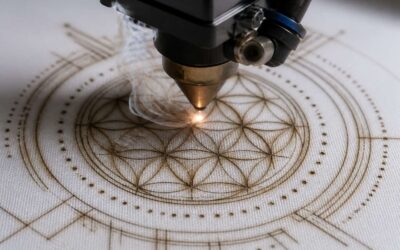
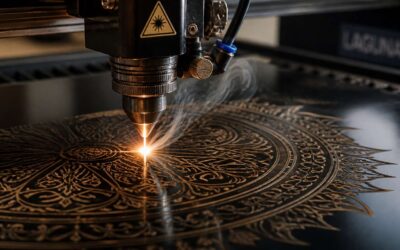
When a client runs a finger across a laser etched surface, they sense the difference immediately. Zmorph laser engraving delivers that tactile finish. The resolution allows fine lines, crisp corners, and shading that looks printed rather than burned. I have seen Johannesburg designers pair thin typography with dense geometric patterns on a single oak offcut. That level of control matters when your brand depends on repetition.
Precision means consistent depth across warped or uneven stock. The machine compensates for minor surface variation, keeping the focal point steady.
Here is what practical accuracy gives you:
- Reproduction of small logo details without blur
- Clean edges on laser-cut acrylic inserts
- Repeatable settings for batch orders
For a local furniture maker, this is the difference between a prototype and a production run. You inspect one piece and trust the next hundred. That is why Zmorph laser engraving holds value beyond the initial price tag.
Software Integration and Workflow
Workflow is where most machines betray you. The software either fights your design file or forces you to rebuild it from scratch. Zmorph laser engraving integrates with the tools your studio already uses. I have watched a Johannesburg signage shop move from CorelDRAW to VCarve without losing a single toolpath. That continuity matters when deadlines are measured in hours.
The workflow rewards repetition without punishing experimentation. Save a material profile once, and the settings follow you across every future job! Calibration data, focus offsets, power curves. All of it persists.
Consider what this means for production:
– Batch consistency without re-entering parameters
– Faster iteration between prototype and final piece
– Less time spent troubleshooting, more time engraving
This is why operators choose Zmorph laser engraving for production work. The machine becomes an extension of the process, not an obstacle to it.
Comparing with Dedicated Laser Engravers
A dedicated laser engraver demands a dedicated room, a dedicated budget, and a dedicated reason for existing. I have watched Johannesburg workshops run one for two hours a day and call it profitable. The arithmetic fails. Zmorph laser engraving delivers the same output without the overhead. Dedicated machines require separate ventilation, separate software, and separate maintenance contracts. A Zmorph unit shares your existing workspace and upkeep. The cost per hour of active engraving drops. So does the risk you carry on slow weeks.
- One machine occupies one floor area
- One maintenance schedule covers every process
- One power point runs the entire system
For most production runs, the speed gap has closed. The remaining difference is capital. That is why more South African fabricators are choosing zmorph laser engraving over a single-purpose unit. The tool adapts to the job list you have this month, not the one you predicted.
Essential Materials for Laser Engraving
Woods and Plywoods
South African hardwoods like kiaat and mopane have dramatic grain patterns, but their natural oils can scatter heat. For clean zmorph laser engraving, you want stable, even surfaces. The first secret lies in moisture content; kiln dried wood below 8% moisture gives crisp lines, while greener stock produces steam and fuzzy edges.
When working with plywoods, the adhesive between veneers matters most. Urea formaldehyde glues can leave a frosted residue that resists the beam. Consider these reliable choices:
- Baltic birch plywood, valued for its tight, consistent core
- Poplar, which cuts predictably and burns light
- Maple veneer ply for high contrast marking
Each material reacts differently to the machine’s power settings. A lighter wood like poplar needs less energy to engrave, preserving detail without darkening the background. I always test a small patch first, because the same board can vary across its width. For craft projects, bamboo plywood offers a uniform texture, but its high silica content may dull the laser lens over time.
Acrylic and Plastics
Acrylic presents a different challenge for zmorph laser engraving. Cast acrylic responds to the beam with a frosted, white finish that looks etched into glass. Extruded acrylic melts more readily, producing a shiny edge that can trap residue. Many South African suppliers stock both, and the distinction matters more than the brand name.
For plastics, the polymer’s composition is the hidden variable. PVC releases chlorine gas when vaporised, so I avoid it entirely. Polycarbonate absorbs infrared energy and discolours. ABS tends to char unevenly at typical power settings. That leaves a short list:
- Cast acrylic sheet for crisp, contrast-rich engraving
- PETG for impact-resistant projects that need a clean cut
- Delrin for durable, low-fume marking
Each polymer demands a different speed and power curve. Testing a coupon before the real piece saves material and frustration. The right plastic turns zmorph laser engraving into a repeatable process rather than a gamble.
Leather and Fabric
Leather and fabric reward patience, not power. For zmorph laser engraving, veg tanned leather yields a crisp sepia brand, while chrome tanned hides release unpleasant fumes and resist contrast. I always test a scrap piece first, because the difference between a supple hide and a brittle one changes the settings entirely.
Natural fibres behave predictably. Cotton and linen crisp up nicely, but polyester melts into a hard bead. Consider these options:
- Veg tanned leather for detailed marks
- Raw cotton for soft, breathable engravings
- Linen for a textured finish
That selection saves me from wasted material every time.
Glass and Stone
Glass and stone reward a steady hand, not a heavy one. With zmorph laser engraving, ordinary soda lime glass can craze under sudden heat, while borosilicate resists shattering. Stone behaves differently again; slate etches pale and chalky, granite takes more passes for a ghostly mark.
I once ruined a beautiful piece of Carrara marble by rushing. The laser left a rough scar instead of a clean carve. That taught me to respect mineral density.
Consider these reliable choices:
- Slate for crisp, high contrast marks
- Marble for delicate grey engravings
- Clear glass with a damp surface for frosted depth
Cast glass and glazed ceramics often crack, so I always verify first. Zmorph laser engraving excels in this realm, but only when the material matches intention. Natural porosity wins over polished shine every time.
Metal Marking Options
Metal demands a different approach. With zmorph laser engraving, anodised aluminium reveals a bright silver core beneath its coloured surface, a clean contrast that never fades. Stainless steel, however, resists direct marking. A marking spray or paste converts the beam into a dark, permanent oxide.
Brass and copper engrave with satisfying depth, but they release toxic fumes. I always run the exhaust at full power. Titanium produces a spectrum of colours when the frequency shifts, though the window between hues is narrow.
For reliable results, I keep these in rotation:
- Anodised aluminium for crisp logos
- Stainless steel with marking compound
- Brass for deep, tactile carves
- Powder coated steel for high speed contrast
Each metal responds to a different power curve. Zmorph laser engraving rewards those who test, adjust, and test again!
Optimizing Laser Engraving Settings
Understanding Power and Speed
Most users set power and speed by trial and error. That wastes material. With zmorph laser engraving, the relationship between these two variables determines everything from depth to edge clarity.
Power controls how much energy the laser delivers. Speed controls how long that energy lingers. Lower speed with lower power gives you clean, detailed marks. Higher power with higher speed cuts deeper without burning edges.
Every material reacts differently. A reliable starting sequence:
- Start at 20% power and 80% speed for fine detail work
- Adjust power in 5% increments until you reach the desired depth
- Reduce speed only after power adjustments stop helping
Change one variable at a time. If you adjust both, you cannot isolate the cause. Keep a test scrap and document each pass. Consistent zmorph laser engraving results come from methodical adjustment, not intuition.
Adjusting Focus and Resolution
Focal distance is the quiet variable in laser work. A lens that sits even a half millimetre off will produce a soft, burnt edge rather than a clean cut. I check this before every session on a zmorph laser engraving system. Most materials need different focus settings because their surfaces vary in flatness and thickness.
Resolution controls the spacing between laser passes. Higher values smooth out gradients but multiply the job time. For many users, a simple benchmark works:
- 300 DPI for bold text and simple graphics
- 600 DPI for fine line work and portraits
- 1000 DPI for high contrast photographic engraving
With zmorph laser engraving, the right combination of focus and resolution changes with each substrate, so those numbers are a starting point, not a rule. Adjust focus first, then set resolution based on the visible texture you need.
Testing and Calibration
Every material batch behaves differently. I keep a test tile for each substrate I run through zmorph laser engraving. A simple grid of lines, fills, and varied speed values tells me more than any spec sheet.
I run a stepped test, changing one variable at a time. Then I log the results in a notebook. Over time, these records become a personal library of material behaviour. It is tedious work, but it saves hours of wasted stock later.
Here is the sequence I follow:
- Clean the material surface
- Run a low power test pass
- Inspect the edge quality
- Adjust and repeat
That routine keeps zmorph laser engraving reliable, even with unfamiliar stock.
Creative Applications and Projects
Personalized Gifts
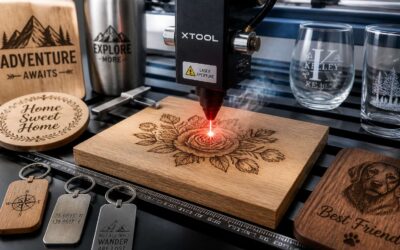
Personalization transforms an object into a statement about the person who receives it. With zmorph laser engraving, you can turn a generic gift into a meaningful artifact in hours. I have watched makers craft plain wooden boards into wedding keepsakes that families will pass down for generations. The laser burns marks into material. It etches memory, intention, and care into the grain.
Consider the range of possibilities:
- Engraving a child’s first drawing onto a leather journal cover
- Marking a brass pocket watch with coordinates of a first home
- Etching a family recipe into a ceramic serving tray
Each project demands a different approach to focus and power. That is where the real skill lives. The flexibility of zmorph laser engraving lets you adjust for unfamiliar materials and textures. Speed changes alone can shift a gift from cold precision to a warmer, handcrafted presence!
Industrial Prototyping
Industrial prototyping demands speed and fidelity. With zmorph laser engraving, you can iterate on enclosures, control panels, and branding elements in a single workflow. The laser burns serial numbers into aluminium prototypes, while the same bed switches to cutting gaskets or masking stencils.
One workshop I visited used the machine to produce functional front panels for medical devices in under an hour. They moved from CAD file to physical test unit without outsourcing a single step. For product teams, the common tasks break down like this:
- Engrave identification marks and QR codes onto prototype housings.
- Cut thin plastic films for display window mockups.
- Mark calibration lines on metal test fixtures.
Each operation mirrors production techniques, which means the prototype behaves like the final unit. That is the essence of zmorph laser engraving in an industrial setting.
Architectural Models
Architectural models carry a unique burden. They must answer questions that blueprints cannot. With zmorph laser engraving, the answers arrive as etched contours, cut layers, and engraved textures. One Johannesburg firm used the machine to recreate a colonial-era bank building. They engraved brick patterns onto basswood, then cut window openings with precision that a knife could not achieve.
- Engrave terrain gradients onto plywood.
- Cut acrylic for transparent elevation studies.
- Mark alignment points for modular assembly.
Every engraved line becomes a clue to the design’s logic. The model stays readable, measurable, and honest.
Jewelry and Accessories
Jewellery designers in South Africa are discovering that machine precision outperforms manual engraving for fine detail. Zmorph laser engraving delivers filigree and linework that survives repeated wear, allowing a small studio to produce pieces that resemble larger factories.
A Johannesburg maker recently engraved intricate patterns on anodised aluminium, then added acrylic inlays for colour contrast. The result carried the precision of a manufactured piece alongside the character of studio work. The machine’s repeatability lets a six-piece bracelet set match perfectly, which matters for gallery submissions.
Zmorph laser engraving handles several jewellery tasks:
– Engrave hallmarks or maker’s marks on clasps and tags
– Cut precise leather cord channels for adjustable necklaces
– Etch texture onto resin pendants without deformation
Each pass on a small component takes less than a minute, so one-off commissions and small batches stay practical.
Signage and Displays
Signage demands legibility from a distance and precision up close. A Johannesburg workshop recently used zmorph laser engraving to produce a three metre retail display, cutting letterforms into brushed aluminium composite. The result held crisp edges under harsh showroom lighting.
For exhibition stands, the machine engraves backlit acrylic panels with consistent depth. One client asked for a series of directional signs across a conference centre. Each panel matched the next, which matters when visitors compare them side by side. I have seen this repeatability save a production run from disaster.
- Engrave tactile wayfinding markers for accessibility
- Cut display stands from plywood with interlocking joints
- Etch brand logos onto acrylic countertop units
Zmorph laser engraving turns a single prototype into a full signage run without losing detail. The repeatability saves time during trade show deadlines!
Educational Projects
A Cape Town high school used zmorph laser engraving to create tactile maps for a local museum. Students engraved contour lines into plywood, then added braille labels. The project taught them cartography, material science, and patience. Each map took forty minutes to run, but the class watched every pass with real interest.
For younger learners, the machine simplifies abstract concepts. We engraved fraction circles from acrylic offcuts. Kids could stack and compare them physically. The tactile feedback made the math stick.
Other classroom ideas follow the same logic:
– Engrave periodic table tiles for chemistry lessons
– Cut puzzle pieces for early childhood development
– Mark rulers with precise graduations for design class
Educational projects also scale well. One technical college produced a full set of cell anatomy models. The laser’s repeatability meant every student got an identical piece. No student felt shortchanged. That consistency builds confidence in the workshop.
Troubleshooting Common Laser Engraving Issues
Burn Marks and Discoloration
Burn marks happen when the zmorph laser engraving system lingers too long on one spot, or when power settings ignore what the material is telling you. Discoloration follows the same logic. I have seen good work ruined by nothing more than a dirty lens.
Common culprits include:
- Speed set too slow for the density of the wood
- Power dialed up past what the material can handle
- Focus drifting off the optimal surface point
Air assist clears smoke before it stains the surface. For South African hardwoods like kiaat, test on scraps first. Each batch of material has its own personality. Adjust one variable at a time, and you will isolate the problem.
Inconsistent Depth
A fraction of a millimetre in material thickness can ruin an entire batch. Inconsistent depth appears as faint lines on one edge and deep gouges on the other. The zmorph laser engraving system relies on a level bed, but material warps under heat and humidity.
Check the substrate before blaming the machine. Plywood hides voids beneath its veneer. Solid timber from a humid Johannesburg workshop can cup overnight. Acrylic sheets vary in thickness by tiny margins.
- Depth fading along the X axis
- Random shallow spots in the middle
- Consistent deep lines near the edges
When depth varies along one axis, suspect the gantry. When it varies randomly, suspect the material itself. Z-step increments reveal the pattern.
Software Connectivity Problems
Software connectivity failures rarely announce themselves. A zmorph laser engraving session can run smoothly for ten minutes before the connection drops mid-vector, freezing the gantry and leaving the file incomplete. I have watched operators blame the machine, only to trace the fault to a loose USB port on a dusty tower in a Durban workshop.
Connection problems usually surface in one of three ways:
- Jobs refuse to start despite a successful file transfer
- Communication errors appear after several minutes of operation
- The software loses the device entirely, demanding a full restart
Power supply fluctuations across South Africa are a frequent culprit. A cheap surge protector can interrupt the serial handshake between the computer and the control board. Cables, drivers, and firmware versions each present their own failure modes. Older machines often run outdated firmware that drops connections when the buffer fills.
Maintenance and Cleaning
Zmorph laser engraving machines accumulate residue with every pass. Vaporized material forms a thin film on the lens and mirrors. In coastal South African workshops, humidity accelerates the buildup, turning fine dust into a gritty paste. I have seen clean files fail solely because the optical path was obscured by a week of neglected maintenance.
The most common fault I encounter in zmorph laser engraving is inconsistent power delivery caused by a dirty contact point. A loose screw or corroded connector can mimic a failing laser tube. Before replacing anything, verify the physical connections. Clean the focus lens after every eight hours of operation. The difference is tangible!
Routine checks should cover:
- Air assist nozzle blockages that deflect the beam
- Lens and mirror contamination from resinous woods
- Loose grounding straps that cause erratic firing
- Exhaust filter saturation that reduces extraction

0 Comments