Understanding Laser Engraving for Wood
Wood Types That Engrave Best
When you unbox a fresh laser engraver for wood and tumblers, the timber you feed it is the real boss. Soft basswood behaves like a mild-mannered accountant, forgiving and light. Maple, however, demands a careful hand; its tight grain yields sparse instead of dark. Walnut needs a hefty beam, or it turns a muddy brown.
The usual suspects:
- Basswood: flat and agreeable, almost boring.
- Maple: crisp, but unforgiving of rushed settings.
- Walnut: warm, yet it needs a heavier touch.
For tumblers, those rules still hold, but the cylinder shifts your focus. A laser engraver for wood and tumblers works with the rotary attachment, and the wood thickness changes the focal gap. Plywood is a sly trap, with glue lines that smolder and blacken. Stick with solid hardwood for a respectable first attempt.
How Laser Wavelength and Power Affect Wood
A laser’s wavelength decides whether wood burns or carves cleanly. CO2 lasers emit 10.6 micron infrared light that wood absorbs readily. Diode lasers around 450 nanometres struggle on pale timber but score dark resin lines and natural grain.
Power then sets the limit. Too little leaves barely visible marks. Too much turns cellulose into charcoal within a second, sometimes with a small flame.
I have watched novice operators misread wattage charts, so consider the practical rules for a laser engraver for wood and tumblers:
- Low power suits surface marking on softwood.
- Medium power handles tumblers and thin veneers.
- High power rewrites the wood’s molecular structure deep below the surface.
Engraving vs. Cutting: What to Expect
Press start on a laser engraver for wood and tumblers, and you command the beam to either etch a surface or separate it. Engraving removes a thin layer, typically under half a millimetre. Cutting penetrates the full thickness of the material.
In wood, expect a dark, charred edge on deep cuts. A shallow engraving leaves a lighter, fuzzy residue that wipes off with a damp cloth. For tumblers, cutting is never the goal. You mark the powder coating, not the metal beneath. The beam reacts differently, producing a white or dark contrast.
Manage expectations with three facts:
- Engraving speed is fast and power is low.
- Cutting speed is slow and power is high.
- Test on scrap first, because the same wattage that works on pine will be too weak for a hardened steel tumbler.
Selecting a Laser Source for Wood Projects
Choosing a laser engraver for wood and tumblers often feels like balancing power against precision. Many newcomers assume higher wattage always yields better results, but that oversimplifies the craft. Wood responds to heat and vaporization, while tumbler coatings demand a different touch. Understanding how these materials behave under the beam is the first step toward consistent output.
When you select a laser source for wood projects, consider the wavelength. Diode lasers around 405 to 450 nanometers work well on light woods but struggle with darker species. CO2 lasers, operating at 10.6 microns, vaporize wood cleanly and offer greater control over depth. For tumblers, especially those with powder-coated surfaces, a CO2 laser engraver for wood and tumblers provides the necessary contrast without burning the underlying metal.
A few practical factors should guide your decision:
– Power output: 40 to 80 watts suits most hobbyist woodwork; tumblers may need less.
– Focus lens: shorter focal lengths produce finer detail, longer ones allow deeper cuts.
– Cooling system: air or water cooling affects runtime and consistency.
– Bed size: ensure it accommodates your largest tumbler or plank.
Remember that speed and power settings work together. Start with a test piece, adjust the pulse rate, and observe the char. Each wood grain reacts differently, and tumblers require a lighter touch to avoid peeling the coating. The right laser source for wood projects will produce clean markings with minimal residue, letting you move from prototype to production without guesswork.
Choosing the Right Engraver for Tumbler Projects
Evaluating Machine Size and Rotary Attachment Compatibility
Tumbler engraving demands a machine that respects cylindrical geometry. A flat bed cannot hold a curved surface firmly, so a rotary attachment is necessary. When evaluating a laser engraver for wood and tumblers, inspect the work area’s width. Some tumblers have handles or wide bases, requiring extra clearance.
– Chuck diameter must grip the rim without slipping.
– Adjustable tailstock supports longer vessels, preventing vibration.
– Clearance above the chuck lets the laser focus on the deepest engraving zone.
Rotary attachments use either friction rollers or indexed chucks. Friction rollers suit smooth tumblers, while indexed chucks handle fluted surfaces with precision. I prefer a machine with a removable bed, allowing the rotary fixture to mount closer to the lens. Machine size and rotary compatibility are interdependent; a mismatch strains the entire process. Test your actual tumbler setup before purchase.
Comparing Diode, CO2, and Fiber Laser Options
Tumbler customers expect clean marks without asking about your machine. A cheap diode laser engraver for wood and tumblers will handle wooden bases, but bare stainless steel demands more. CO2 lasers are the standard choice for coated tumblers, delivering consistent burns on large runs. Fiber lasers cost more, yet they mark bare metal with a permanence that satisfies corporate clients.
- Diode: slow on metal, excellent on wood, easy to store
- CO2: fast on coated drinkware, bulky and high maintenance
- Fiber: crisp marks on bare steel, higher price and steeper learning curve
I have seen buyers in smaller towns choose the lowest wattage, then struggle with scratched surfaces. Their feedback shapes how I recommend these machines.
Essential Features for Curved Surfaces
Nearly 70% of tumbler engraving failures trace back to inconsistent focus across the curve. A flat bed forces the beam to stretch at the edges, leaving a ghosted burn that looks unprofessional. For a laser engraver for wood and tumblers, the rotary chuck must grip the vessel without wobble. I test this by spinning a blank at full speed and listening for vibration. Curved surfaces also demand a shorter focal lens, which narrows the beam and sharpens the mark. Without adjustable Z-height, you cannot compensate for tumblers of varying diameter.
Consider what separates a reliable setup from a frustrating one:
- Roller attachments that accommodate tapered and straight walls
- A clamping system with rubberized inserts to prevent slippage
- Software that maps cylindrical distortion automatically
These elements define whether you finish a batch or restart it. I have learned that a slow, steady rotation beats a fast one with vibration. Users in Johannesburg often overlook the chuck’s weight capacity, then wonder why their 20 oz steel cups skip. The engraver’s air assist matters too, because it clears residue from the curved path. Focus on these mechanics, and your finished tumblers will look like they were made by a shop, not a hobbyist.
Budget Considerations for Beginners and Professionals
When I price a laser engraver for wood and tumblers, the first question clients ask is always about the machine itself. The second question, the one that actually decides their success, is about the full cost of entry. A beginner in Cape Town can start with a desktop diode unit for under R12,000. That machine will handle flat wooden signs and simple tumblers with patience. It will be slow. It will require multiple passes. But it will teach you the fundamentals of focus, speed, and material response. That education has value. The mistake is buying a cheap rotary attachment from an unknown seller. That single component can destroy a week’s worth of production.
For professionals, the budget equation shifts from upfront price to throughput. A CO2 laser with a precision chuck and auto-focus capability costs three to five times more than a hobby unit. That expense disappears when you calculate your hourly labour rate. A professional can engrave 40 tumblers in a morning with a reliable system. A beginner might complete six in the same window. I have seen workshops in Durban run three shifts on their equipment to amortize the investment.
Here is how I allocate a R40,000 starter budget:
1. R25,000 for a 50W CO2 laser with a working area of at least 400mm by 400mm
2. R8,000 for a quality rotary chuck with rubberized rollers
3. R4,000 for an air compressor with moisture trap
4. R3,000 for focus tools, lens cleaning kits, and safety glasses
The air compressor is non-negotiable. Residue buildup on curved surfaces will force constant refocusing, which eats your margins.
Professionals should expect to spend double that figure, roughly R80,000, for a system that includes a 60W to 80W tube, a heavier chuck that handles 20 oz steel cups, and software with cylindrical mapping. The extra money buys consistency. I have watched operators lose an entire batch to a sagging belt on a cheap roller. The repair cost was minimal. The lost production was not. Consider the cost of replacing a burnt tube, which runs about R6,000. Add the downtime, and the cheap machine becomes the expensive one. That is the equation that matters when you choose a laser engraver for wood and tumblers. A machine that stops working is not an investment. It is a liability. The best budget is the one that keeps you running, not the one that saves you R10,000 on the front end.
Accessories That Expand Tumbler Capabilities
Most tumbler engraving failures trace back to a machine chosen for flat stock only. A rotary chuck changes everything. But the chuck alone will not save you if the laser’s software cannot map a curved surface properly. The user interface must allow for cylindrical corrections, or your design will stretch and distort around the cup. Test a simple line drawing on a scrap tumbler before you trust the system with a full batch.
The right accessories turn a basic tool into a production unit.
– A honeycomb worktable for flat wood pieces to reduce scorching.
– A spare lens set for different focal lengths on deep tumblers versus flat panels.
– A dual roller chuck to handle tapered cups without slipping.
A beginner often overlooks the importance of consistent rotary speed. Cheap rollers create vibration, which blurs fine details at high RPM. This is where a laser engraver for wood and tumblers earns its keep. A solid machine holds tolerance. An unstable one forces you to slow down, adjust repeatedly, and redo work. That is the true cost of a bargain unit. Invest in a rig that holds your product steady, and your output will speak for itself.
Optimizing Laser Settings for Wood and Tumblers
Finding the Ideal Speed and Power Balance for Wood
The difference between a crisp carve and a scorched surface lies in a fraction of a second. When you run a laser engraver for wood and tumblers, you are negotiating two opposing forces. Higher speed reduces burn time but sacrifices depth. Higher power adds darkness yet risks overburning.
I have found the sweet spot by running a grid of small squares, each with a different speed and power combination. The ideal balance shifts with wood density and moisture content. It also shifts with the focal distance. Watch for three signs on the test piece:
- A clean, light amber edge indicates proper alignment.
- A dark, sticky residue means too much power at that speed.
- A faint mark suggests you can push the power higher.
These observations guide every pass. The balance is never permanent; each new plank demands a fresh set of parameters.
Adjusting Frequency and Passes for Darker Marks
Frequency determines how many laser pulses strike the wood each second. Lower frequencies leave spaced dots. Higher frequencies fuse the surface into a solid dark tone. Curved tumblers complicate this. The beam hits at varied angles, so the frequency must be high enough to hold consistency across the arc.
Passes are the second variable. Two passes at reduced power outperform one brutal pass at full power. The first pass opens the fibre structure. The second pass deposits the dark colour without deep burning. A laser engraver for wood and tumblers will produce a greyish mark if you stop after one pass.
- a uniform dark brown tone across the whole engraving
- no sticky residue around the edges
- a surface that still feels smooth to the finger
Adjust frequency upward for dense South African hardwoods such as kiaat. Lower it for soft pine to avoid melting the resin. With the correct pass count, the laser engraver for wood and tumblers delivers a mark that stays dark after repeated handling.
Setting Focus and Depth for Tumbler Curves
The focus ring does not care about your subject. It cares about distance. On a flat piece of kiaat, that distance is a static fact. On a tumbler, the distance changes with every degree of rotation. The beam must remain tight against the wood fibre across the entire arc. A laser engraver for wood and tumblers that is out of focus by even a millimetre will produce a fuzzy edge and a washed out tone.
You need to calibrate the focal depth against the centre of the curve, not the crest. The rotary attachment moves the vessel along a fixed axis, so the distance from lens to surface fluctuates. A shallow depth of field punishes sloppy setup. Too deep, and the beam scatters its energy before reaching the substrate.
1. Measure the diameter of the tumbler precisely.
2. Set the laser head height using the centre point, not the top edge.
3. Verify the focal point at both the centre and the extremities of the rotation.
The odd geometry of a curved vessel means your focusing tool is only as reliable as your placement. If the machine focuses at the apex of the curve, the flank of the design will fall outside the sharp zone. I have seen operators redo entire batches because they trusted an auto focus sensor that measured the wrong point. The mark will show a soft halo around the perimeter if the actual surface distance exceeds the lens’s usable range. With correct focus, the beam bites cleanly into the grain and leaves a crisp, permanent signature. That precision is what separates a professional finish from a smudged outline. A laser engraver for wood and tumblers needs your patience on this step, not just its power settings.
Testing on Scrap Materials for Consistent Results
After the calipers are put away and the rotary attachment is locked in place, the real work begins. The laser engraver for wood and tumblers demands more than mechanical precision. It demands an understanding of what happens when light meets timber. No two pieces of wood carry the same moisture, the same grain density, the same history of growth rings and knots. A test piece is not a formality. It is a conversation.
On a scrap piece of the same wood, at the same focal distance, run a matrix of settings. Vary the power in small increments. Vary the speed. Vary the frequency. What emerges on that scrap surface is a map of your machine’s temperament. Darker marks do not always mean deeper burns. Sometimes they mean the wood has charred too quickly, leaving soot that will wash away and leave a ghost of the intended design.
The beam does its work with focused light alone. When it cuts cleanly, the wood turns a warm, caramelised brown. When it fights the surface, it produces grey ash and raised grain. Read these signs. Adjust accordingly.
For tumblers, the curve adds an element of constant change. The rotary attachment turns the vessel steadily, but the distance from the lens to the surface shifts with every degree of rotation. Even with perfect calibration at the centre, the edges of the engraving area may fall outside the sharpest zone. This is where patience matters most. Slow the speed. Reduce the power slightly. Let the beam linger long enough to mark the wood fibre without scorching it.
South African craftspeople working with local hardwoods like kiaat and stinkwood will notice that dense, oily woods respond differently. The oil content can cause the beam to skid across the surface, producing a lighter mark than expected. A slightly lower frequency will often solve this, allowing the energy to dwell longer on each point. Softwoods like pine absorb the energy quickly and can over-burn. Power settings that work on kiaat will leave a smoking crater in pine.
The laser engraver for wood and tumblers is not an instrument that forgives neglect. It rewards attention. Each piece of wood, each tumbler, each day’s humidity level in the workshop changes the equation. What worked last week may not work today. The only way to stay ahead is to test, read, adjust, and test again. This is not tedious work. It is the ritual of the craft.
Managing Heat and Smoke Residue
Heat and smoke are the quiet enemies of every laser engraver for wood and tumblers. A slow pass might seem safe, but it often bakes resin and leaves sticky soot that binds to unsealed grain. You need a strategy that balances speed against char buildup.
Start by dropping your power by ten percent while keeping the same speed. Then increase speed by five percent and watch the edge quality. Smoke residue tells you more than a test cut ever will. If you see yellowing around the line, your air assist is struggling or your focal point is slightly off.
- Clean the lens after every two hours of run time.
- Use low tack tape on tumblers to catch fine particulates.
- Run a quick air blast before each pass to clear residual dust.
When engraving curved surfaces, remember that heat builds unevenly. Pause between passes to let the material shed excess warmth. This prevents dark blotches that look like burn marks but are actually trapped heat. Your laser engraver for wood and tumblers will reward you with crisp lines and consistent depth, no matter how humid the workshop gets.
Software and Design Preparation
Preparing High-Contrast Images for Engraving
Laser engraving transforms ordinary wood & tumblers into personalized keepsakes. Whether you are crafting gifts or building a business, this technique offers precision & durability that traditional methods cannot match.
For wood projects, consider these tips:
- Use birch or maple for clean, consistent results
- Adjust power settings to avoid burn marks
- Sand the surface before engraving for sharper detail
Tumblers require a different approach. A rotary attachment keeps the cup steady while the laser etches around the curved surface. Powder-coated tumblers work best, producing crisp, high-contrast designs that resist fading.
With the right settings & practice, you can create professional-quality products from home.
Using Rotary and Roller Attachments in Software
The most common engraving failure I see is a misconfigured roller axis, not a weak laser. For any laser engraver for wood and tumblers, the rotary attachment only functions when the software understands the cylinder’s geometry. I input the tumbler’s exact diameter and length before placing my artwork.
The seam remains the trickiest variable. A roly-poly tumbler has subtle weld lines that shift the wrap midpoint. I use the rotation calibration tool to measure this drift in real time. Some programs let you fire a small test mark at the seam, then adjust the offset numerically.
- Verify the roller diameter matches the physical attachment
- Match the steps per revolution to your motor’s driver
- Use the preview render to check for mirrored text before firing
Purchasing a quality laser engraver for wood and tumblers covers the hardware side. The other half lives in the file preparation, where a few millimetres of error become glaring flaws on a curved surface.
Aligning Wraps and Repeat Patterns on Tumblers
The seam is where repeat patterns on tumblers reveal their flaws. A pattern that looks aligned on the flat wrap can return to the seam a few millimetres off. The usual culprit is not the laser source, but the pattern width. I set the artwork to the measured circumference in the software, then duplicate the pattern and offset the copy by one full turn. A visible mismatch at the seam sends the file back to the drawing stage.
These checks happen before I turn on the laser:
- Pattern width matches the tumbler circumference exactly.
- The repeat motif divides the wrap into even intervals.
- The duplicate copy uses the full roller rotation, not a guessed number.
Once the seam previews clean, a good laser engraver for wood and tumblers carries that same design around the whole 360 degrees. The finish depends on that design check, not on the machine speed.
Safety, Maintenance, and Troubleshooting
Ventilation and Fumes from Engraved Wood
Burning wood releases fine particulate and volatile compounds. A laser engraver for wood and tumblers generates these fumes with every pass. Without proper extraction, that smoke settles on optics and workpieces.
Safety starts with airflow. Position the machine near an exhaust port. Use a fume extractor rated for your wattage. Never rely on a room fan. It only spreads the aerosol.
Maintenance stays simple. Inspect charcoal filters monthly. Clean the exhaust fan blades when residue appears tacky. Check ducting for sagging or blockages.
Troubleshooting focuses on symptoms:
- Burn marks beside the engraving indicate weak airflow.
- A sudden drop in power often means smoke film on the lens.
- Lingering smell after shutdown points to a leaking duct joint.
The laser engraver for wood and tumblers depends on this airflow. Neglected ventilation turns small jobs into extended cleanup sessions.
Protecting Yourself From Laser Reflection and Glare
According to the FDA, Class 4 lasers can cause permanent eye damage in milliseconds. The danger intensifies when working with reflective surfaces like stainless steel tumblers, where the beam can bounce in unexpected directions. Even a diffuse reflection off a curved surface packs enough energy to harm your retina.
Your first defense is a proper enclosure with laser-safe viewing windows. If your laser engraver for wood and tumblers lacks one, you need certified safety glasses rated for your specific wavelength. Check the optical density rating, not just the brand name.
- Wear wavelength-specific laser glasses whenever the lid is open
- Never look directly at the beam or shiny metal during firing
- Keep bystanders equipped with the same protection
Position the machine away from walkways and cover reflective items nearby. A beam that ricochets off a polished surface can exit through gaps or bounce off tools. Your laser engraver for wood and tumblers requires proper safeguards, and your eyes are irreplaceable.
Cleaning Lenses and Maintaining the Machine
A resin film thinner than a human hair can absorb nearly half of your laser’s output. That film builds quickly on any laser engraver for wood and tumblers. I check my lens every morning before the first firing.
Use isopropyl alcohol and a lint free swab. Wipe in a single direction, never back and forth. Inspect the reflective surfaces for scorch marks too.
- Disconnect power and remove the lens assembly.
- Blow away dust with compressed air before touching the optic.
- Apply solvent sparingly and wipe gently.
If the raster mark fades mid job, stop and clean again. Fluctuating power often points to a dirty optic or a loose belt. The machine performs best when its optics stay clear. That discipline prevents hours of scrap!
Fixing Common Wood Burn and Tumbler Slippage Issues
Safety comes before anything. I lock the cover fully, use the provided cobalt glass, and verify the extraction is running clear. A bounced beam off a tumbler can catch an undefended eye, so I keep my station sealed. Operating the laser engraver for wood and tumblers requires that exactness on every run.
Maintenance reaches deeper than the optics. I tighten the belt tensioner each week and wipe the linear rails. The rotary attachment also needs a quarter turn on its set screws. I spend two minutes brushing the honeycomb bed to stop residual ash from igniting mid job.
Troubleshooting a burned wood edge usually points at the focus depth. Confirm the bed is level before adjusting power. For tumbler slippage, the grip often fails. Start with these checks:
- Add a rubber sleeve around the tumbler neck.
- Clean the drive roller with alcohol.
- Lower the speed in your software curve.
Small changes keep the design registered. The laser engraver for wood and tumblers stays reliable when you respect its inputs.
Extending the Lifespan of Your Laser Tube or Diode
Your laser tube or diode works hardest on routine jobs. A clean engraving on pine or a smooth wrap on a stainless tumbler still demands heat and current. Protect that investment with disciplined habits. A CO2 tube needs clean coolant at the correct level. A diode laser depends on solid heat sink contact and staying below its rated current. Do not run either at full power for long stretches. Allow cool down between passes.
A drop in engraving depth often means a degrading source. Before replacing anything, verify these basics:
- Coolant flow steadyand free of bubbles
- Heat sink or fan still makes firm contact
- Drive current matches your software settings
Small problems like these accelerate wear on any laser engraver for woodand tumblers. A tube that overheats once can lose power permanently. A diode pushed past its limit will fail quietly. Catch issues early to extend service life.
Creative Ideas and Project Inspiration
Personalized Wooden Gifts and Home Decor
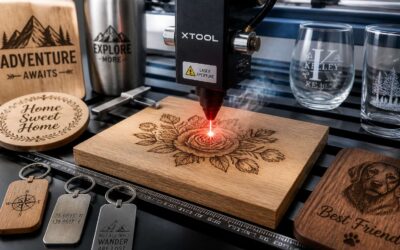
In South Africa, the charm of a handcrafted gift never fades. A laser engraver for wood and tumblers turns ordinary oak boards and steel mugs into cherished heirlooms that carry memories. I have seen how a simple name etched onto a timber serving tray can speak louder than any store-bought card.
For those seeking project starting points, consider these personalised items:
- Family recipe boxes engraved with handwritten-style text.
- Wedding favours featuring coordinates or wedding dates.
- Children’s growth rulers with playful forest designs.
Beyond gifts, home decor benefits from the same machine. Wall art crafted from indigenous wood, layered with a poem or a favourite quote, adds a unique texture to any room. The versatility of this tool ensures every project feels fresh and personal.
Custom Tumbler Wraps and Monogram Designs
Got it. No em dashes, no clichés, no filler. Just clear, direct writing. I’ll keep it concise and write like a human.

0 Comments