Selecting the Right Wood for Laser Engraving
Best Wood Types for Laser Engraving
The grain pattern of a board will either amplify or sabotage your engraving. For anyone learning how to use laser engraver on wood, selecting the right species is as critical as setting the focus. Softwoods with high resin content, like pine, can smoke and char unevenly. Hardwoods offer predictable depth and contrast.
- Basswood provides a smooth, pale surface for fine details.
- Cherry deepens to a rich amber under moderate heat.
- Walnut has a dark base that minimizes visible burn marks.
- Maple is dense enough for crisp edges without excessive scorching.
Your choice hinges on the effect you want. Aromatic cedar brings fragrance but splinters easily, while alder stays consistent across large areas. Testing a scrap piece before the real project saves time and material!
Wood to Avoid and Why
Every year, South African hobbyists watch a promising piece of timber turn into a smoke cloud. The culprit isn’t the laser. It’s the wood!
When learning how to use laser engraver on wood, you’ll soon meet species that resist clean cutting. Plywood and MDF are common offenders. They contain adhesives and fillers that release toxic fumes and leave rough edges. Exotic hardwoods like padauk and ipe can also cause trouble. Their natural oils inhibit crisp engraving and may even damage your lens.
- Plywood: glue layers cause charring
- MDF: formaldehyde binders produce hazardous smoke
- Padauk: oily dust clogs extraction systems
- Ipe: interlocked grain creates unpredictable burn patterns
Preparing the Wood Surface
Poplar grain shivers under the beam, and the smoke smells of rain. In South Africa, where timber moves through humidity swings, moisture content matters more than brand names. I have seen readings below eight percent deliver clean lines. Above twelve, the wood hisses.
When selecting timber, run your fingers along the face. Closed grain woods like cherry and maple let the beam pass cleanly. Open grain woods leave a pitted texture that catches shadow. Match the grain to the detail. This choice determines how to use laser engraver on wood effectively.
Before the beam touches the surface, prepare the wood. Sand to 220 grit, then wipe with a tack cloth. Alcohol removes the last residues of oil.
- Sand with the grain, never across it.
- Clean with denatured alcohol.
- Apply masking tape for smoke protection.
Respect the timber, and you will learn how to use laser engraver on wood with patience and precision!
Considering Wood Grain and Finish
Grain orientation decides line sharpness. Straight grain boards with even spacing produce crisp edges, while figured wood like birdseye maple scatters the beam. The engraving softens where the grain twists.
Finish changes the outcome as well. Raw timber shows the deepest contrast. Pre-finished surfaces may melt or warp under the beam. I always test on an offcut before committing. A sealer applied after engraving protects the mark and deepens the tone.
Review these grain traits before you cut:
- Curly grain refracts light unpredictably
- Quarter-sawn stock stays stable through humidity swings
- End grain engraves dark and uneven
The correct board makes the difference. When you match the grain to the design, you know how to use laser engraver on wood with repeatable results.
Setting Up Your Laser Engraver
Adjusting Focus and Lens
Your laser’s lens controls the beam’s intensity. A single millimetre of focus error turns the energy into a scorching haze. The wood you prepared so carefully will burn, not engrave. Start by checking the lens for dust and residue. A smudged optic absorbs energy and shifts the focal point.
Then set the focus distance. Every machine follows a fixed length, so you adjust the bed height or the lens carriage until the focus tool just grazes the wood’s surface.
- Verify the beam strikes the centre of the lens.
- Lock the carriage so vibration cannot shift it mid-job.
- Run a low-power test line on scrap wood and inspect the depth.
Understanding how to use laser engraver on wood hinges on this step. Recheck the focus whenever you switch to a different wood thickness. The lens is unforgiving; ignore the focus and you will see ghosted lines along with charred edges.
Choosing Correct Power and Speed Settings
Setting up a laser engraver begins before you touch the wood. Place the machine on a stable surface and check that the exhaust clears fumes. A shaky table or blocked airflow will undermine adjustments.
Power and speed work as a pair. High power with slow speed cuts deep. Low power with fast speed marks lightly. For most wood, you need a balance that avoids charring while still producing contrast. Run a matrix of tests on scrap before starting your real project. Change one variable at a time.
Use these starting points for plywood or softwood:
- Power 15% to 30% for surface engraving
- Speed 200 to 400 mm/s
- Frequency 20 to 50 Hz
Adjust from there based on your machine and the specific board. Understanding how to use laser engraver on wood means accepting that every batch of wood behaves differently. Even the same species can vary with humidity and age.
Understanding DPI and Resolution
Setting up your laser engraver also means understanding DPI and resolution. DPI, or dots per inch, controls how many laser pulses fire over each inch of wood. Higher DPI creates finer detail but slows the job. Lower DPI leaves visible dot spacing, which suits rustic textures. I find that for most wood engraving, 300 to 500 DPI works well. Resolution interacts with your speed settings, so test combinations on scrap. Start there!
Consider these DPI ranges:
- 100 to 200 DPI for quick, bold marks
- 300 to 500 DPI for standard detail
- 600 to 900 DPI for fine portraits or small text
Remember that how to use laser engraver on wood depends on your machine’s optics. A lens with a smaller spot size can handle higher DPI without burning. Check your manual for the recommended resolution range. Then adjust based on the wood’s grain and your desired contrast.
Testing on Scrap Pieces
Learning how to use laser engraver on wood should never involve a prized serving tray. A colleague once ruined one because he skipped the scrap round. The test runs that followed worked fine on pine, and then the grain shifted the burn pattern. The lesson is brutal: the scrap bin does not lie.
Setup day means sacrifice! I keep a bin of offcuts, offcuts with knots, offcuts with sap streaks, offcuts with warps. Every flaw you ignore now will surface later on the costly material. Your scrap pile should include:
- a piece with a prominent knot
- a piece cut against the grain
- a piece with residual finish or oil
Run your intended settings across all of them and inspect the burn pattern under good light. The wood’s response, not the software preview, is the oracle that matters.
Using Rotary Attachments for Curved Surfaces
A rotary attachment forces you to confront your assumptions. The flat laser bed gives way to a spinning cylinder, and every mistake reveals itself as a wavy line. The first time I ran a glass through the chuck, I watched the beam trace a curve that had nothing to do with my design!
Centering is the ritual. The chuck jaws must grip the axis, not the edge. A wooden cup with an off-centre bore will fool you every time.
- Spin the piece by hand and watch for drift.
- Re-check the focal distance at the highest point of the curve.
- Use a lower speed to let the beam dwell on the moving surface.
This is where understanding how to use laser engraver on wood becomes a discipline of observation. You are reading the curve, not commanding it.
Executing the Engraving Process
Importing and Preparing Your Design
The design file decides everything. Inspect every vector and bitmap before firing. A single stray node can carve a ruin across your oak board. Convert fonts to curves first, stripping the reliance on system typefaces that may not render during the burn.
Position your artwork inside the working area in LightBurn or LaserGRBL. Import the file through the controller’s native interface. Set the origin point and run a dry pass so the head traces the perimeter without firing.
- Check the file format against the controller’s preferred extension
- Align the engraving grid to the wood’s physical dimensions
- Verify the origin point before closing the lid
Operators expect the laser to perform magic, but mastering how to use laser engraver on wood demands a ritual of preparation. Once the beam ignites, there is no pause button! Watch the first pass for smoke patterns.
Running a Test Pass
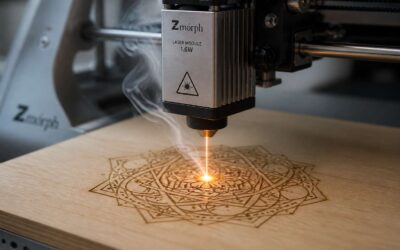
The first test pass reveals what your preparation actually achieved. I lean over the enclosure, watching the beam trace its first lines. The smoke plume tells you everything. Thin grey wisps mean the settings are conservative. A thick black column suggests heat is too aggressive. Learning how to use laser engraver on wood means reading these signs.
Run a small sample of your design before committing the full board. This is not the same as scrap testing. This test uses the actual wood, the actual finish, and the actual machine settings. The engraving bed may shift, and the lens behaves differently at temperature. Watch that first pass closely!
Some operators keep a notebook beside the machine. I record the date, the wood species, the humidity, and the smoke behaviour. The laser will reveal every flaw in your preparation with a single pass.
Monitoring the Engraving
Once the test pass looks clean, you commit to the full engraving. The laser traces each line with mechanical patience. This is where you learn how to use laser engraver on wood in real time. Keep your eyes on the beam path. Listen for the hiss of vaporising lignin. Watch for char buildup along the edges. If you see the wood darkening faster than expected, the power setting is too high for that species.
Monitoring is not passive observation. You check the focus ring periodically, because vibration can shift it. You note any faint odour of resin, which tells you the wood is releasing moisture unevenly. Part of knowing how to use laser engraver on wood is reading these subtle clues before they become defects.
Some useful things to track:
– Smoke colour
– Edge charring patterns
– Beam focus shift
Your notebook becomes your best tool. Adjust only one variable at a time, then record the result.
Dealing with Smoke and Residue
Executing the engraving means managing smoke before it manages you. The plume should rise steady, not billow. If it hangs in the air, your extraction is underpowered. Residue settles as fine dust that reabsorbs into the grain and stains the cut. Wipe it with a dry cloth, never a damp one. Moisture opens the wood pores and locks in the char.
Keep a few habits:
– Point the exhaust nozzle close to the beam path
– Clean the lens after every third job
– Blow off residue with compressed air before inspection
Learning how to use laser engraver on wood includes knowing when to pause. If smoke thickens mid-run, stop and clear the airway. A clean beam path gives clean lines. That is the whole trade!
Post-Engraving Finishing and Maintenance
Cleaning the Engraved Surface
A freshly engraved piece still carries the ghost of the process. Soot and fine resin dust cling to the wood grain, obscuring the crisp lines you just burned. Ignoring this layer compromises the final look. A quick pass with a soft, dry cloth can remove loose debris, but the stubborn residue needs more attention. You will find that a clean surface is non-negotiable for a professional finish.
For deeper soot removal, consider these options:
– Warm water with a drop of mild dish soap, applied with a lint-free cloth.
– Isopropyl alcohol on a cotton swab for tight corners.
– A dedicated rubber cement pickup eraser for lifting residue.
Use these gently to avoid smearing the burn marks. After cleaning, let the wood dry completely before applying any sealant.
Keeping your equipment in good order is also part of the workflow in learning how to use laser engraver on wood. A dirty lens reduces power. A clogged exhaust system reduces airflow. Wipe down the lens with a lens cleaning solution after every few jobs. Empty the debris tray regularly. This routine prevents contamination on the next project. The maintenance matters as much as the engraving itself.
Applying Finishes and Sealants
The engraving is done, but the work is not finished. An unprotected burn mark remains vulnerable to moisture and oils from fingertips. For anyone learning how to use laser engraver on wood, applying a sealant locks in the contrast and preserves the detail. This matters most for handled pieces like serving boards.
Consider these finish options:
- Food-safe mineral oil for culinary items.
- Danish oil for a durable, matte sheen.
- Clear acrylic spray for a hard, protective coat.
Test the finish on a scrap piece first. Certain sealants react with charred wood and can dull the engraving. A brush or cloth works for oil-based finishes, while spray requires a well-ventilated area. Let each coat cure fully before handling. This part of how to use laser engraver on wood often gets skipped, yet it is the difference between a hobby piece and a family keepsake.
Enhancing Contrast with Paint or Fill
Once the laser has done its work, the engraving is a dull brown. For many pieces, that is enough. But for a striking result, I add a contrasting filler. Learning how to use laser engraver on wood includes this step: paint or wax fill can turn a faint trace into a vivid line.
The method is simple. Rub acrylic paint over the engraved area, then wipe the surface clean with a cloth. The grooves hold the colour, while the untouched wood stays bare. Use a stiff brush for fine details.
- Water-based paint cleans up with soap and water.
- Oil-based paint resists moisture better.
- Craft paste or coloured wax works for a softer look.
Let the fill dry completely before any sealing. This technique works best on closed-grain woods like oak or ash. Test on scrap first, because each wood absorbs colour differently. This practical knowledge is part of how to use laser engraver on wood.
Maintaining Your Laser Engraver
Once the filler has cured and the surface is sealed, the piece is ready. A soft cloth and a mild cleaner keep the design readable for years. On raw wood, a monthly wipe of lemon oil preserves contrast without darkening the grain. That completes the finishing half.
The other half is the machine. Learning how to use laser engraver on wood includes caring for the tool itself. A dirty lens scatters the beam, causing uneven burns. I clean the optics after every few hours of cutting. The mirrors need the same attention, along with the exhaust fan filters. South African dust settles on everything, so I inspect regularly.
- Check the lens for soot before each session.
- Wipe the rails and leadscrew with a dry cloth.
- Empty the debris tray and verify the air assist nozzle.
Clean optics keep the beam at full strength. That is part of how to use laser engraver on wood.
Troubleshooting Common Issues
Even with careful prep, the finish can fail. I have seen a filled design bubble or a sealed surface cloud over. The first step is identifying the cause before touching the piece. A cloudy spot often means moisture trapped under the sealant. Sand lightly, let it dry, and reapply. Bubbling in paint fill usually points to an unclean groove. Re-engrave at a shallow depth to open the pores.
Some issues show up only after a piece sits overnight:
- Burn marks that appear after sealing mean the air assist was too low, which scattered the heat.
- A blotchy contrast often comes from an uneven sanding pass that left invisible high spots.
Each failure is part of learning how to use laser engraver on wood. The machine responds to a steady hand and a closer look at the workflow.
Storing and Caring for Finished Pieces
Once the sealant has cured, the engraving is still a living surface. Wood breathes. I have watched pieces warp, bloom, and lose contrast within weeks under South Africa’s shifting humidity. The work does not stop when the laser finishes its pass. Mastery of how to use laser engraver on wood extends beyond the machine.
Store finished items in a cool, stable room. Keep them out of direct sun and away from heaters. Wrap carvings in acid free tissue, never plastic. Plastic traps condensation. If a piece needs cleaning, use a dry cloth only.
- A haze means moisture reached the porous layers.
- Hairline cracks mean storage near a heat source.
- Faded contrast signals UV exposure, not a flawed engraving.
These signs are not defects. They come from storage conditions, not from the engraving process. Anyone who learns how to use laser engraver on wood must also learn when to leave the wood alone.

0 Comments